PowerSchool Parent Portal
HELPFUL INFORMATION TO CREATE AND USE YOUR POWERSCHOOL PARENT ACCOUNT

The PowerSchool parent portal is an online portal accessible from anywhere with internet access. Parents and guardians may view their child’s information in one place, including grades, attendance, schedules, and school bulletins.
To go directly to the PowerSchool Parent login page, CLICK HERE
If you do not have a PowerSchool Parent Account, follow the information below to create one. If you have simply forgotten your password, please click the link above and follow the steps to retrieve your password. Do not create a new account. If you are having difficulties setting up an account, please contact the SHDHS Technology Department by opening a ticket at [email protected].
Each parent must create an account to use PowerSchool. (This is a one-time process; once created, you’ll never need to create an account again.) This feature of PowerSchool will allow each parent to have his/her own username and password. It will also allow parents of multiple children to combine accounts and give a parent the ability to grant a grandparent, guardian, divorced parent, or other designee access to the child’s grades. (Students do not set up accounts in PowerSchool. They will use the account that was created for them by the school office.)
Create a NEW Parent Account
- To create a new Parent Account in PowerSchool, you will need your child’s school to request a PowerSchool access ID and access password. This information is emailed to the family during the enrollment/registration process. If you still have not received the information, please email [email protected]. This will be different for each student.
- Open a web browser to the PowerSchool Parent Portal using this web address: https://shdhs.powerschool.com/public
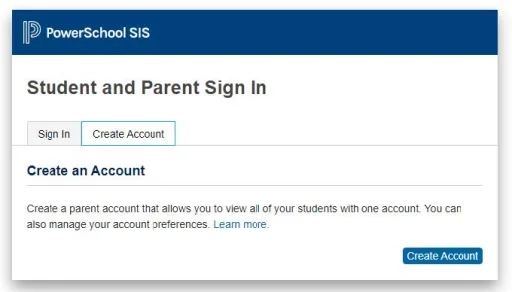
- Select the Create Account tab and click the Create Account button.
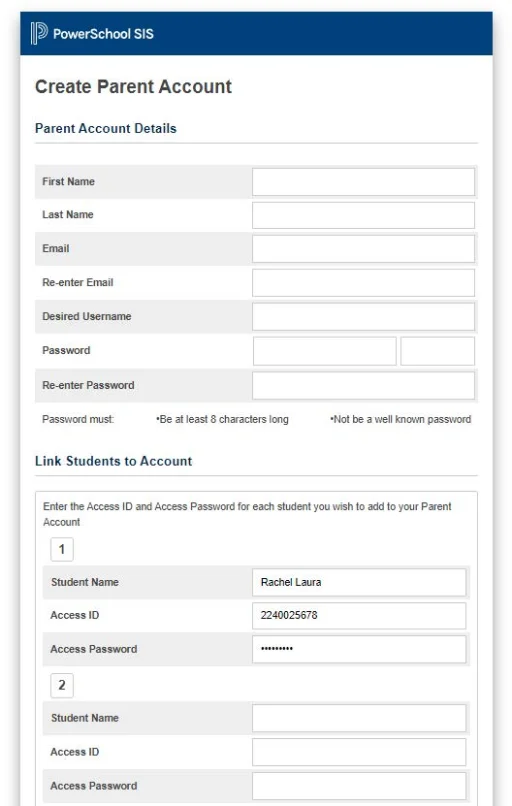
- Complete the Parent Account Details section with your name and email address. Create a username and password. (Passwords must be at least 8 characters long.)
- In the Link Students to Account section, fill in your student’s name along with the Access ID and Access Password you were given. Add all of your children at this time, or add additional children at a later date by clicking Account Preferences at the top right corner of the screen.
- Click Enter at the bottom
Sign In to PowerSchool with a Current Parent Account
- Go to https://shdhs.powerschool.com/public
- Select the Sign In tab and enter the Username and Password you created.
- Click the Sign In button.
Forgot your Username or Password? Click Forgot Username or Password and fill in the requested information.





 The Sara Meineke Memorial Scholarship
 Charlotte Ruehl Flynn Memorial Scholarship